Product Photography Course · One-on-One Private Lessons · Istanbul / Berlin / Online

Product Photography Course and One-on-One Private Lessons

Product photography training focuses on making decisions regarding the camera, lighting, surfaces, color, reflections, framing, and post-production while working with actual products. The current program is designed as one-on-one private lessons with Burak Bulut Yıldırım and is tailored to the student’s equipment, product category, and distribution channel.

The program can be tailored to suit everything from beginner-level needs to professional workflows. We’ll create a customized work plan based on your needs, drawing from topics such as white-background e-commerce photography, glossy and matte surfaces, small products, macro photography, and product photography with decorative elements, as well as Lightroom, Capture One, and Photoshop.

Professional experience since 2005 6,000+ students Sony Alpha Europe Imaging Ambassador, 2018–2026 Istanbul · Berlin · Online
Private Product Photography Lesson with Burak Bulut Yıldırım
The one-on-one program can be tailored based on the student’s own materials, equipment, and the visuals they wish to create.
Education and Industry Experience

The institutions and professional roles on which educational practice is based

Brand names are used in the context of employee training, workshops, seminars, or professional duties.

Sony Alpha EuropePHOTONMicrosoftIKEA TurkeySiemensBlueTurkcellAllianzBusiness BankKoçSistemÖzdilekPandoraDuracellAktifbank
Selected from among 386 Google reviews

How do students describe their hands-on training?

These three comments directly address the topics of studio practice, individual programs, and acquiring knowledge during class.

5/5 · GOOGLE
“I took a two-day studio photography course in Istanbul, followed by an online Lightroom and Photoshop course. I already had some basic knowledge, but I learned the ins and outs of the process, and now I know what to do and when to do it.”
Hüseyin Enes Yigin
5/5 · GOOGLE
“Even though my schedule didn’t allow me to attend group classes, I was able to take advantage of the one-on-one training options and get to know myself better. In a short period of time, I had the opportunity to receive genuine training. Mr. Burak is respectful, warm, and a truly excellent instructor.”
Ramazan Zengin
5/5 · GOOGLE
“Over the course of two days, we had a very productive and enjoyable session with Burak Hocam. Thank you for sharing your valuable insights. The atmosphere was positive, and the entire team consisted of kind, good-natured people.”
Ugur Binay

From the genuine customer reviews posted on Google for LUX Production / Burak Bulut Photography Workshop, we selected the ones most relevant to the topic of education. Check out the Google reviews.

4 core areas of work

What is a product photography course?

The product photography course covers four stages, from preparing a product for a shoot to the final deliverable: lighting and camera setup, surface and reflection control, framing and color decisions, and post-production and delivery format. In the one-on-one program, these stages are arranged according to the student’s specific needs.

01 · E-commerce

White background and catalog

Pure white background, controlled shading, correct perspective, standard for continuous shooting, and file preparation for the marketplace.

02 · Surface

Glossy, transparent, and matte products

Wide light sources, flags, diffusion, reflections, and the direction of light that brings out the texture.

03 · Small product

Macro and sharpness

Depth of field, tripod use, the principles of focus stacking, and cleaning and detail checking on small surfaces.

04 · Editing

Color, Retouching, and Output

RAW processing, color balance, product cleanup, clipping, layer arrangement, sRGB, and output based on the intended use.

Hands-on practice with real products

Why do different surfaces require different lighting?

Shiny metal, leather, and jewelry cannot be photographed using the same lighting setup. In class, we analyze the product’s surface; the size, direction, distance, diffusion, and softboxes of the light source are adjusted accordingly. The goal is to develop a reproducible decision-making process rather than relying on a rote formula.

Study of Texture and Light Direction in a Leather Product Photograph
A sense of volume and material on textured surfaces.
Surface, props, and lighting setup in a product photo with props
The relationship between the product, the background, and props in a stylized photo shoot.
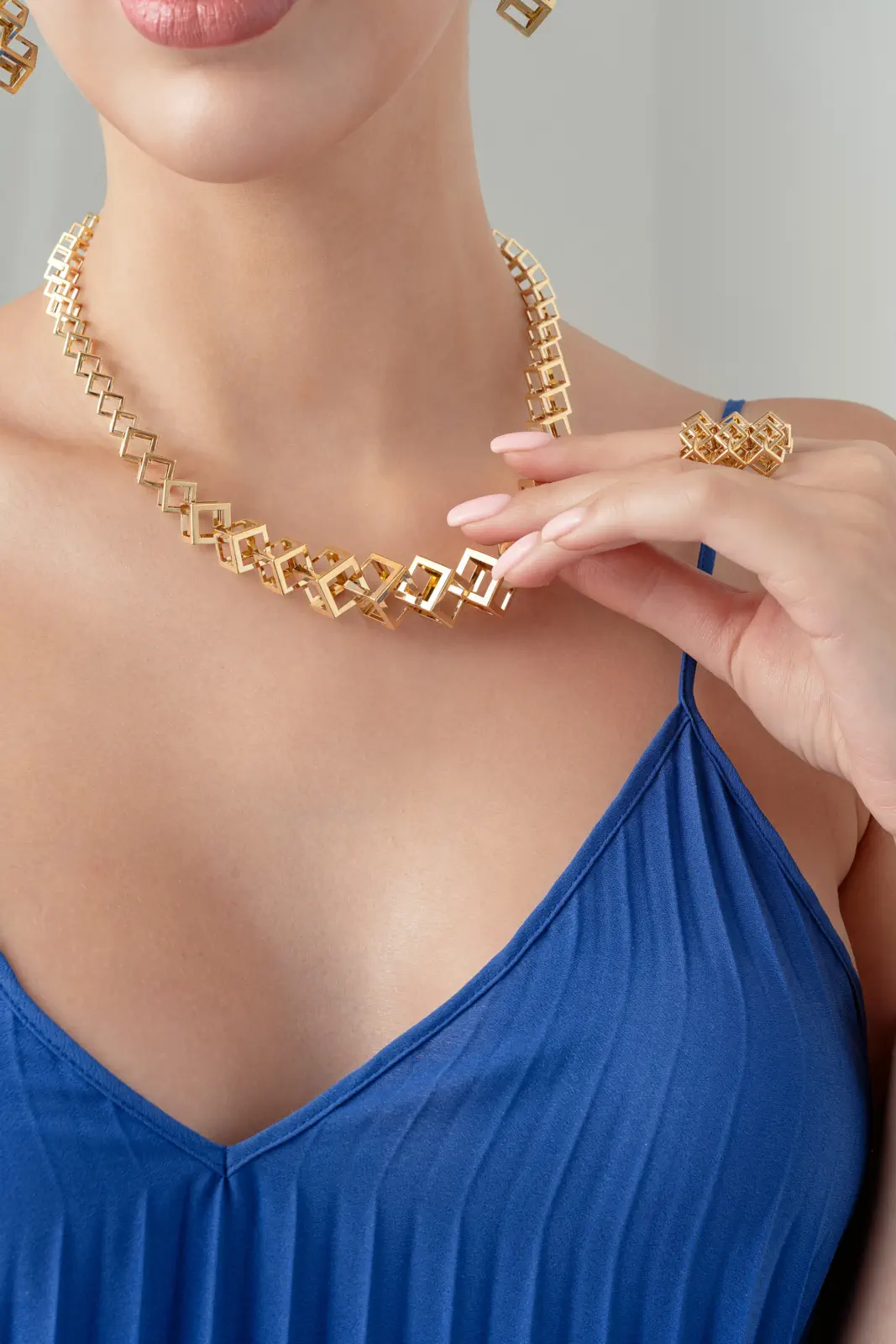
Macro Focus and Reflection Control in Jewelry Photography
Macro sharpness and controlled reflections on small, shiny surfaces.

Let's create a program based on your product and your goals

Please describe your product category, the camera and lighting equipment you use, your current skill level, and the type of visuals you’d like to create. Let’s work together to determine which sections are best suited for in-person or online sessions.

A One-on-One Program in 4 Steps

How do you create a product photography curriculum?

The program is set up in four steps: the objective and distribution channel are determined, the product and equipment are evaluated, a shoot plan is prepared, and the results of the shoot are reviewed together. This ensures that a beginner brand owner and a photographer looking to move into commercial photography do not follow the same curriculum.

1

Goal

The purpose is determined: e-commerce, catalog, social media, styled photoshoot, or professional portfolio.

2

Products and Equipment

The product's surface, dimensions, color accuracy, camera, lens, lighting, and workspace are evaluated.

3

Shooting Schedule

The lighting setup, light direction, angle list, framing, focus method, and scope of editing are prepared.

4

Application

The footage is shot, the files are reviewed on the computer, and a working workflow is established.

Technical Scope

What topics are covered in product photography training?

The course curriculum can be organized into six technical topics: equipment, lighting, surface, framing, color, and post-production. Each topic is explored in greater depth depending on the product’s distribution channel; for example, a marketplace main image and a stylized campaign shot do not use the same shooting and output standards.

01 · Equipment

Camera, Lens, and Stabilization

Sensor and resolution requirements, focal length, perspective, tripod, remote triggering, and shooting connection.

02 · Light

Flash and continuous light

The size, distance, direction, and contrast of the light source; the use of softboxes, diffusers, reflectors, grids, and barn doors.

03 · Surface

Reflection and Texture Control

Controlled transitions, edge definition, and a sense of material on glossy, transparent, metallic, matte, and textured surfaces.

04 · Frame

Angle, Ratio, and Series Consistency

Main image, detail shots, usage shots, and scale shots; maintaining camera height and framing consistency across the product family.

05 · Color

White balance and color management

Calibration screen, gray card or color target, RAW processing, controlled saturation, and sRGB output for the web.

06 · Retouching

Cleaning, trimming, and delivery

Dust and surface cleaning, color correction, layer organization, clipping, shading, resizing, and file naming.

Surface-based method

How does the approach differ for glossy, matte, and small products?

The surface of an object determines the visible appearance of light before the position of the light source. The following three groups summarize the key differences in decision-making used during the course.

Product groupThe fundamental problemMethod UsedCheckpoint
Shiny and transparentEnvironment, camera, and harsh light reflectionsWide diffusion surfaces, flags, controlled edge transitionsA clean and balanced reflection that conveys the form
Matte and texturedThe surface appears flat and two-dimensionalSide lighting, contrast adjustment, shadow and highlight balanceThe Relationship Between Texture, Volume, and True Color
Micro and macroLimited depth of field and minor imperfectionsTripod, precise focus, appropriate aperture, focus stacking if necessarySharpness, cleanliness, and the look of natural materials
Course Format

Can product photography training be done online?

Yes. The online course covers equipment selection, shot analysis, color, Lightroom, Capture One, Photoshop, and workflow. For sections involving lighting setup, reflection control, and hands-on practice with your own products, in-person sessions are more effective. The program can also be structured to incorporate both formats.

Online

Topics that can be worked on using the screen

  • Technical Analysis of Current Charts
  • Lightroom, Capture One, and Photoshop
  • Equipment and Studio Setup Plan
  • Assignment Standards and Portfolio Assessment
Face-to-face

Topics that require hands-on practice

  • Selection of Light Source and Shaper
  • Glossy Surface and Glare Control
  • Product preparation, lighting, and camera angle
  • Tethered shooting and real-time file review
Class Day Workflow

Can you work with your own products?

Yes. Working with your own product ensures that the class is directly linked to your daily production. Before the class, product photos, dimensions, surface details, and intended use are shared; during the session, framing, focus, and reflections are checked together on the computer; and at the end of the class, key decisions are summarized so you can replicate the setup later.

Before class

Product and Target Information

Please share a photo of your product, its approximate dimensions, your current equipment, and sample images.

During class

Setup and Live Monitoring

Lighting, background, and camera angle are set up; the footage is zoomed in on the screen to assess sharpness, color, and reflections.

At the end of the class

Repeatable method

The setup used, critical measurements, lighting setup, and post-production sequence are tailored to your specific workflow.

Commercial production practices

What product shoot experience is the training based on?

Burak Bulut Yıldırım and LUX Production have been working with products featuring various surfaces and usage channels since 2005. The following 14 project experiences represent real-world production challenges that can be addressed in class, such as white-background shots, decorated sets, macro photography, packaging, use of models, and product videos.

Cyrene CosmeticsProduct photo with a white background and props
Eyüp Sabri TuncerProduct and concept advertising photo shoots
Topface CosmeticsCatalog and concept product photo shoots
Tuborg TurkeyWhite-background and still-life photography
Yemeksepeti BanabiProduct and promotional images
Artchi LondonStyled, white background, and 360-degree product photography
By Eda Dogan JewelryJewelry photography, video, and decorated set
Marapon GmbHHome Textiles Photography and Video Production
Yamoda GmbHWhite background and lifestyle product photography
ColorN DriveCar Care Products Photo Shoot
HolzaugeDecorative photos and videos of wooden products
SoleyHome textiles, stylized photography and video
Rocs ToothpasteProduct launch and brand image photo shoots
Flesh & SoulJewelry still life and product video

If you're looking for professional photography services Scope of product photography services you can examine.

Student Experiences

One-on-one lessons, feedback on lighting, and professional development

These 7 comments focus on tailoring content to specific needs, clear explanations, the amount of practice, and achieving results that can be applied after class.

5/5 · GOOGLE
“First and foremost, he’s very kind and warm-hearted—you’ll feel right at home with Burak Hoca. In terms of technical knowledge, he’s far more skilled than many who simply call themselves ‘photographers,’ and he’s an instructor who’s excellent at sharing his knowledge. He’s great at analyzing the needs of the people he’s working with.”
İLKER AWCI
5/5 · GOOGLE
“I took a class from Burak Bulut, whom I consider to be a successful photographer, and started doing children’s photography. During the one-on-one instruction, I had the opportunity to ask everything I was curious about, and thanks to the information he shared, I’m now taking higher-quality photos.”
Sibel Süleymanoğlu
5/5 · GOOGLE
“We took a private lesson on lighting from Burak Bulut. By the end of the class, we had no unanswered questions left. We left the workshop having truly internalized the material and practiced enough.”
Ender Yurtoğlu
5/5 · GOOGLE
“They offer professional training; Burak Hoca personally oversees the program and teaches everything down to the finest detail. I took modeling and Photoshop classes at the studio. I’ve also attended his workshops a few times.”
Fatih Sezgin
5/5 · GOOGLE
“Burak Bulut stands out in photography education thanks to his talent and experience, offering high-quality instruction.”
Barış Cem Şahin
5/5 · GOOGLE
“I’d like to thank my instructor, Burak, for helping me go from knowing nothing to being able to achieve so much. Thanks to his dedicated approach and effective teaching style, I’ve now decided to take the second level as well.”
Clarity Diamond
5/5 · GOOGLE
“I was a complete amateur, but thanks to you, I’ve come to understand what photography is all about. With your friendly team and professional work, you can have a very productive time and get great results.”
Ege Pia

View all 386 Google reviews.

A lesson can be planned even for a single product-related issue

You don’t have to go through the entire program from the beginning. We can tailor the scope of work to focus on a single topic, such as glossy surfaces, white backgrounds, jewelry clarity, color management, Photoshop retouching, or the analysis of your existing photos.

Frequently Asked Questions

Questions about the product photography course

Is the product photography course still being offered?

Current training is structured as one-on-one private lessons with Burak Bulut Yıldırım, rather than a fixed classroom program. The content is tailored to the student’s skill level, product, equipment, and intended use case. This approach allows for time to be dedicated directly to the specific shooting and editing topics needed, rather than following a general curriculum.

Who is the product photography training course intended for?

The program is suitable for brand owners who photograph their own products, e-commerce teams, content creators, and photographers looking to transition into commercial product photography. It begins with the basics of cameras and lighting at the beginner level. For experienced participants, topics such as reflections, macro focus, color management, and professional workflows can be explored in greater depth using product examples.

Can I use my own products in class?

Yes. The product’s approximate dimensions, surface, available photos, and the platform on which it will be used are shared before the class. During in-person sessions, the product is brought to the photo shoot set; lighting, background, framing, and focus are set up for the product. This method makes it easier to apply the composition learned in class to the same product group later on.

Can a product photography class be taken online?

This online course covers the analysis of existing shots, equipment planning, Lightroom, Capture One, Photoshop, color correction, retouching, and file standards. In-person sessions are more effective for topics such as glossy surfaces, reflection control, and physical lighting setups. The program can combine online and in-person sessions as needed.

What camera and lighting equipment do I need to get started?

A specific camera brand or an expensive lighting system is not required. First, the product size, surface type, distribution channel, and workspace are evaluated. We determine what can be achieved with the existing cameras, lenses, and lighting; the equipment that is truly necessary is then planned based on the intended use and budget.

Can we do a photo shoot for jewelry, cosmetics, and products against a white background?

Yes. The course curriculum can be tailored to areas such as e-commerce photography on a white background, small and shiny products, macro photography, glass, metal, packaging, and product photography featuring decorative elements. The number and depth of topics are determined based on the student’s skill level and the products they bring; the same lighting setup is not used for every category.

Are Photoshop, Lightroom, and Capture One included in the training?

Depending on the project’s needs, one or more of these three software programs can be used. Lightroom and Capture One can be used for RAW processing, white balance, tone, and color correction; Photoshop can be used for dust removal, surface retouching, clipping, shadows, layer structure, and preparing output for various applications.

What factors determine the price of a product photography course?

The scope of the training is planned based on the student’s skill level, the type of product to be worked on, whether the format is in-person or online, and the required duration for shooting and post-production. For this reason, a fixed starting price is not published. Once you provide your goals, project, and equipment, we will prepare a suitable course outline and format.

How many classes or how many days does the program last?

The duration is determined based on the number of topics you wish to learn and your practical needs. A single issue related to lighting or retouching can be addressed in a short session. Programs covering the full range of topics—including camera, lighting, surfaces, shooting, color, and post-production—are scheduled over multiple sessions based on your practical needs.

Is it possible to have a brief introductory meeting before the class?

Yes. During the brief consultation, we’ll discuss your current skill level, the equipment you use, your product category, the challenges you face, and the visuals you’d like to create. This consultation is used to determine in advance—more accurately—whether an in-person or online format is appropriate, which products to bring, and how the course should be organized into technical topics.

Enter your product category and the topic you'd like to learn about

Please send us details about the camera, lens, and lighting equipment you use; a photo of your product; your current skill level; and your intended use case. Let’s work together to clarify the scope of work for Istanbul, Berlin, or an online format.

A lesson can also be planned to address a single shiny surface, a white background, macro focus, or a Photoshop issue.

Related training and services

Pages you can review before the program

Service area: In-person training sessions are scheduled at the Istanbul studio and, for eligible programs, in the Berlin service area. Participants from different cities and countries can join the online training sessions.

The page content was last updated in July 2026.

Burak Bulut Yıldırım is a photographer and photography instructor based in Berlin and Istanbul. He is not the same person as the Turkish pop singer Burak Bulut.