Amazon A+ Content: Visual Planning and Implementation Guide for 2026
Amazon A+ Content is an Amazon tool that enhances product detail pages with advanced visuals, text layouts, comparison tables, and brand story modules. Standard A+ explains product features and benefits; Premium A+ offers larger images, video, and interactive modules; and Brand Story tells the brand’s story and introduces its product family in the “From the brand” section. The purpose of the visual layout is to clearly answer customers’ questions about size, usage, materials, product differences, and brand trust directly on the page.
According to Amazon’s current general statement, a professional seller account is required for A+ Content. For a brand registered in Brand Registry, Brand Representative or Reseller Users with the appropriate role can create content through A+ Content Manager; account, country, and catalog eligibility must be verified within Seller Central. Standard A+ can be set up with up to five modules, while Premium A+ can be set up with up to seven modules. Options such as video, interactive hotspots, image or video carousels, and Q&A are included in Premium A+.
This page explains A+ Content as a best-practice guide; however, the key factor determining the outcome is the accuracy of the images used in the modules. If the product surface, color, scale, and usage scenario are not photographed correctly, the content area will appear full but will not provide sufficient evidence to support a purchase decision. For this reason, the A+ plan Product photography for Amazon We handle this process step by step: first, we determine which customer question will be answered with which visual, and then we decide on the shooting and delivery format.
Since 2005 Product photography and video production · Istanbul studio and Berlin/Europe service area · From more than 10 countries Production of product and marketplace visuals for an e-commerce brand.
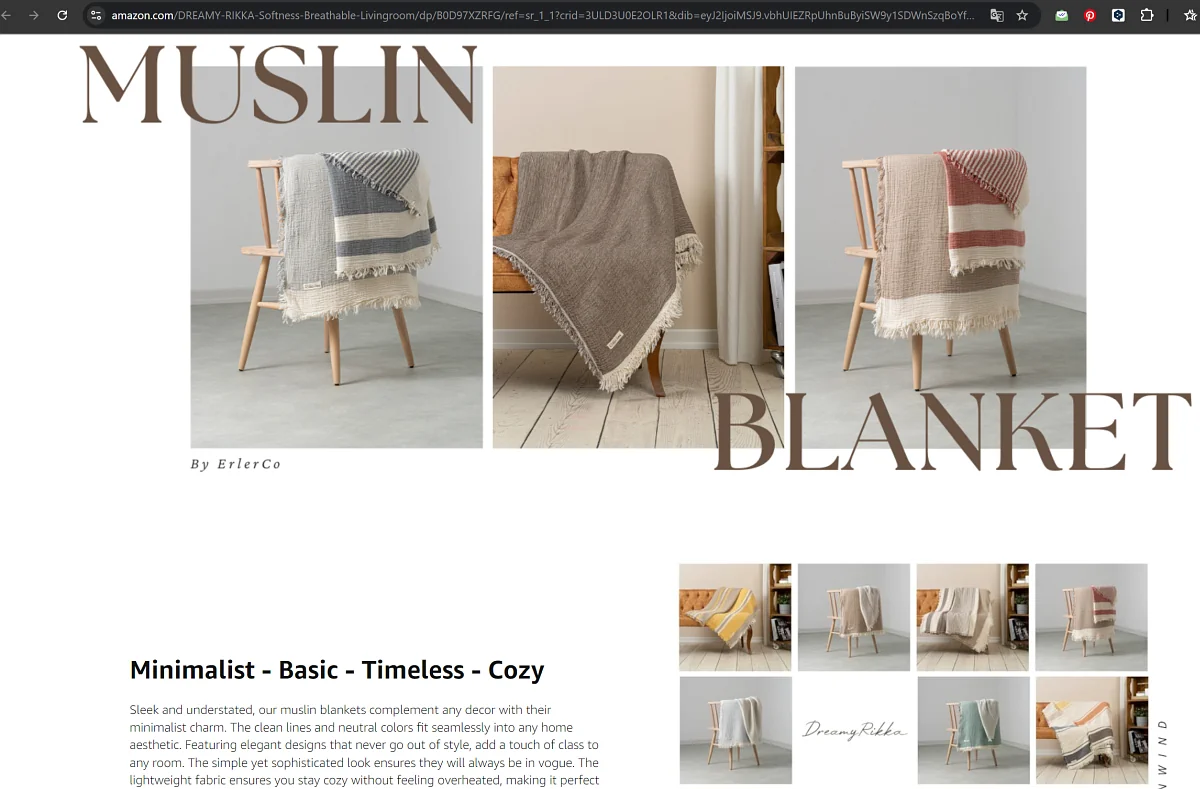
A still from a LUX Production e-commerce photoshoot: For A+ Content, product, detail, measurement, and usage images are all prepared as part of the same production plan.
Some of the brands for which we have created product and marketplace visuals
"A professional and wonderful team. We entrust the entire process of both decorated and white-background photo shoots for our Dreamy Rikka brand—for all domestic and international marketplaces—to them with complete peace of mind. You definitely won’t need to look for any other options."
Çiğdem Görel · Dreamy Rikka Home Textiles 5/5Marketplace product photoshoot · Google review
"They photographed the product images for our e-commerce company with great care, using professional, high-quality photographers. We were very satisfied with this service, which we used for the first time from an external provider. The pricing for the photo shoot was also very reasonable."
"As an eyewear brand, we are very pleased with the studio. We are planning a long-term partnership. Their product photography, communication, and attention to detail are top-notch."
Eyeofhorus Eyewear 5/5Product photoshoot · Google review
On this page
A+ Content definition · access requirements · Differences between Standard A+, Premium A+, and Brand Story · required visuals · module and layout plan · filming and design process · publishing guidelines · customer experiences · frequently asked questions.
What is Amazon A+ Content, and what does it solve?
A+ Content is the modular content system used in the “Product Description” section of the product detail page. Here, the brand explains the product’s features, usage, dimensions, materials, and its place within the product family using visuals and brief text. Its purpose is to reduce the number of questions in the customer’s mind and support the purchasing decision with more product evidence.
Who uses it?
Users who have a Professional Sales account and hold the role of Brand Representative or Reseller for a brand registered in Brand Registry. Final access is managed through the A+ Content Manager screen in the relevant country’s account.
What should be added?
The Standard A+ plan includes images, text, logos, and comparison tables; the Premium A+ plan includes all of these plus larger images, videos, hotspots, carousels, Q&A sections, and advanced comparison modules.
What doesn't it solve?
A weak main image alone cannot make up for missing product information, incorrect pricing, or a poor customer experience. A+ Content is built on accurate product data and strong main listing images.
2026 Access and Structure Note: Amazon categorizes A+ Content into three main types: Basic, Premium, and Brand Story. For Basic A+, up to five modules can be used per ASIN; for Premium A+, up to seven modules can be used. Premium eligibility and available modules must be verified within the A+ Content Manager based on the account and marketplace. Amazon’s official statement on A+ Content.
A common issue with A+ projects is that the brand only has product photos with a white background. These images may be necessary for the main listing; however, A+ modules require additional evidence to answer questions about dimensions, materials, usage, package contents, and product differences. Therefore, the process begins not with module selection, but with a shoot list prepared based on customer questions.
Who oversees the production of A+ visuals?
Lighting and composition decisions were made by, who has been a Sony Europe Imaging Ambassador since 2018, Burak Bulut Yildirim manages. Product presentation, physical set design, selection of props, and visual coherence Meryem Aydın Yıldırım is planned by [name]. Within the same project brief, a white-background shot, a stylized still life, a model-based usage scene, and a short product video can all be produced together; the main visual, detail shots, dimension shots, and usage shots are all prepared within the same visual system.
Products from various cities in Turkey can be shipped to the Istanbul studio; the selection, editing, and delivery processes are handled remotely. For projects in Berlin and Europe, the shooting location, crew, and product logistics are planned on a project-by-project basis.
Let's create a visual and module layout for your A+ page
Please share the ASINs, the target Amazon marketplace, the existing product page, and the product listing. Let’s plan together the white-background images, detail shots, usage shots, comparison shots, and video footage required for Standard A+, Premium A+, or Brand Story.
The difference between Standard A+, Premium A+, and Brand Story
A+ Content is not a single format. Basic A+ explains the product’s features and benefits; Premium A+ offers larger visual areas and interactive modules; and Brand Story tells the brand’s story and introduces the product family in the “From the brand” section. These three structures can draw from the same visual system, but each should address a different customer question.
Content type
Its primary purpose is
Visual requirements
When is it a priority?
Standard A+ Content
Turn product features into benefits; explain usage, technical details, and points of comparison. A maximum of five modules per ASIN.
If the page looks basic but incomplete, or if the customer has technical concerns.
Premium A+ Content
Showcase the product with larger images, video, hotspots, image or video carousels, Q&A, and advanced comparison features. Up to seven modules per ASIN.
Large-scale compositions, short how-to videos, storyboard visuals, and visual sets suitable for interactive modules.
If the brand is appropriate, or if the price point or competition calls for a more compelling visual explanation.
Brand Story
Showcase the brand’s context, values, and product family in the “From the brand” section; provide links to the products and the Brand Store.
Compositions showcasing the product family, production context, founder or team visuals, and brand continuity.
If brand awareness is low, or if the goal is to encourage cross-product-family switching or strengthen the connection to the store.
Premium A+ compliance rating: Premium access is not automatically granted to every Brand Registry account. Amazon’s current requirements include the publication of a Brand Story on the brand’s product listings and at least five approved A+ content pieces within the last 12 months; final eligibility must be confirmed via the eligibility notification in the A+ Content Manager. Premium A+ Module Guide.
Application note: The most effective results are achieved by designing the Brand Story within the same visual system as Basic or Premium A+, but with different messages. Product, detail, usage, and brand shots produced on the same shoot day can be used across multiple modules.
What images are needed for A+ content?
A shooting plan for A+ should be conceived on a broader scale than a standard product shoot. The main image showcases the product; A+ Content, on the other hand, presents the visual evidence customers need to make a decision. We’ll proceed by focusing on three main groups.
01 · Detail photos
Material, stitching, surface, lid, hardware, interior space, and perceived quality. The texture of cosmetic packaging; gemstones and craftsmanship in jewelry; zippers and interior compartments in bags. Color accuracy and controlled lighting are priorities.
02 · Lifestyle Images
The product’s actual context of use: home, bathroom, desk, office, or sports use; scale and ergonomics of the model or hand-held model. The customer relates the product to their own scenario.
03 · Explanatory Charts
The combination of photos, icons, and brief text makes technical information easy to read at a glance: dimensions and capacity, features and benefits, and model comparisons.
In close-ups and macro shots, color accuracy and controlled lighting are top priorities; these images convey the quality of materials and craftsmanship in the A+ category.
Is a white background sufficient for an Amazon A+ photo shoot?
An image with a white background is a basic requirement for the main listing; however, for A+ Content, it is often not sufficient on its own. A+ modules require additional images that explain usage, materials, dimensions, package contents, and customer benefits. Therefore, Product photo on a white background with a cutout, product shot with decor, when necessary, the model or hand model and a short video are scheduled on the same shoot list. A usage scene is not mandatory for every product; it is required only if scale, ergonomics, or the method of use influence the decision.
How do you select modules and create a visual layout plan?
The image areas for Amazon A+ modules vary. Some modules require a wide horizontal image, some a square detail image, and others a comparison or video layout. If a module map is not prepared before the shoot, important product details may be cropped out or end up hidden beneath text areas.
Need
Appropriate image type
Be careful during filming
Design risk
Highlight the main benefit
Wide horizontal banner or usage scene
Space should be left for the text overlay area.
Cropping or text overlay on mobile.
Showcasing materials and quality
Macro details, textured light, surface shots
Color accuracy and controlled lighting are the top priorities.
Excessive glare or incorrect white balance.
Explaining scale and usage
Model, handheld model, desktop, or indoor use
Product dimensions should not be misrepresented.
The image looks good, but it doesn't describe the product.
Compare models
Product family and variation images
The angle, lighting, and framing should be consistent across all products.
The differences become impossible to discern from the table.
Video for Premium A+
Short how-to video, animated details, demo
The video should showcase the product's promise within the first few seconds.
It’s just like a brand film—it doesn’t address the product issue.
Size and file warning. Amazon’s general comparison guide provides width references of 970 × 300 px for Basic A+ and 1464 × 600 px for Premium A+; however, the aspect ratio and dimensions required for each module may vary. The final dimensions should be obtained from the A+ Content Manager module card in the relevant country’s account. Amazon’s general help text specifies that files must be high-resolution RGB images in JPG, PNG, or BMP format and under 2 MB in size. Both the mobile and desktop previews should be checked together before submission. Amazon A+ Content Image Guidelines.
2026 Artificial Intelligence Report: A+ Content Manager may display “AI Ready” modules in certain areas. Generated text and visuals must be reviewed prior to publication to ensure the accuracy of product features, claims, colors, dimensions, and materials. At LUX Production, main product and explanatory visuals are created using the actual product, a physical set, and controlled lighting; artificial intelligence may only be used to support concept development or preliminary visualization and must not be used to misleadingly alter the product’s physical characteristics. Amazon’s A+ Content Workflow.
The filming and design process for Amazon A+ Content
A+ Content creation is not just about taking photos. Customer objections on the page, module order, product family, the need for visual descriptions, and delivery formats are all planned together.
1Project Summary and Page Analysis
The ASIN, product category, target market, current product page, and product pages to be compared are reviewed.
2Module Map
It is determined which information will be presented in a banner, which in a detailed section, and which in a table or video.
3Shot list
The white background, details, usage scenes, dimensions, model, hand model, physical set, and video requirements are identified.
4Photo and Video Production
Lighting, lenses, angles, backgrounds, props, and color management are planned according to the product category.
5Design and Adaptation
Images are scaled to fit the A+ module dimensions; typography and explanatory text are added.
6Delivery and Inspection
Files are exported according to module dimensions; mobile cropping, readability, and file size are checked.
The delivery timeframe is determined based on the number of products, the type of shoot, the number of A+ modules, and the scope of design and retouching. For standard e-commerce projects, the selection and delivery schedule is finalized at the start of the project; for many projects, a timeframe of 3–10 business days applies. The quote is prepared based on the number of products, type of shoot, need for models or physical sets, video, design, and scope of delivery.
Lifestyle and usage scenarios illustrate a product’s scale and ergonomics; they provide strong decision support in the A+ segment for bags, home textiles, cosmetics, and kitchen products.
Marketplace and video context
A+ Content is just one part of an Amazon product detail page. The main image, white background, product details, video, headline, and bullet points should all work together. The same visual system can be adapted not only for Amazon but also for other sales channels; therefore, the A+ plan Trendyol and Amazon Product Photoshoot We design it within that scope. For the upload side, Guide to Adding Product Images on Amazon, for animated content product demonstration video can be used.
Common Mistakes and Pre-Publication Checks
A+ content often falls short due to poor image selection, excessive text, module incompatibility, and mobile cropping. Quality control isn’t just a minor step taken after the shoot—it’s a discipline that begins at the briefing stage.
Convert the product page into a general brand brochure.
Adding long captions to every image and not taking mobile cropping areas into account.
Displaying a product's size or color differently than it actually is.
Mixing stock images with the real product experience.
Repeat the same message in the heading, bullet points, and A+.
Add price, discount, delivery, warranty, contact information, external link, or QR code.
Using unverifiable claims of superiority, such as “best,” “best-selling,” or similar.
Uploading a low-resolution image or failing to check both the desktop and mobile previews.
Before publication, it must be verified whether each module answers a single customer question, whether the details are legible in close-up, whether the dimensions and usage scenarios are misleading, whether the comparison helps make a decision, and whether the content complies with Amazon’s current restrictions. The desktop and mobile previews within the A+ Content Manager should be reviewed together.
Official publication guidelines: Amazon may not accept price and promotional information, shipping details, warranty or guarantee text, QR codes, external links, contact information, or unsubstantiated claims of superiority in A+ content. You must own the rights to any photos, videos, and text you use. Since the rules may change depending on the marketplace and over time, please review them before submission. Amazon’s Current A+ Design and Restrictions Guide It should be checked.
Our Customers' Experiences
From among the 380+ customer reviews posted on Google for LUX Production / Burak Bulut Photography Studio, we selected the ones most relevant to product photography and e-commerce projects.
“We’re very pleased with their work. They’re a professional, efficient team that delivers the same high quality on every shoot. We highly recommend them.”
Uğur Düzel · Ahoy Towels LLC 5/5E-commerce product photography · Google review
“A studio I found entirely online and reached out to—they gave me an amazing experience. You can contact them with complete confidence for any project in this field; we were very satisfied with our product photos and videos.”
Bengisu Deres · Physkit Berlin 5/5Remote product photography · Google review
"We had both product shots and stylized photos taken. They turned out really great—so beautiful and elegant. They’re definitely worth the price. We sell jewelry."
Mülkiye Çınar · Jewelry 5/5Jewelry Product Photography · Google Review
Please provide the ASINs, the target Amazon marketplace, the existing product page, the product listing, and the type of A+ content you need. The module map, shot list, design ratios, and scope of delivery will be prepared accordingly. Products can be shipped to the Istanbul studio; projects in Berlin and Europe are planned on a case-by-case basis.
Frequently Asked Questions About Amazon A+ Content
What is Amazon A+ Content?
Amazon A+ Content is a content tool that enhances the "Product Description" section on the product detail page with advanced visuals, short text snippets, comparison tables, and other modules. It is used to more clearly explain the product’s usage, dimensions, materials, benefits, and its place within the product family.
Who can use A+ Content?
According to Amazon’s current general guidelines, a Professional Selling Account is required. Users with a Brand Representative or Reseller role for a brand registered in Brand Registry can create content through A+ Content Manager. Account, catalog, and country eligibility must be verified within Seller Central.
What is the difference between Standard A+ and Premium A+?
The Standard A+ format enhances product information with image, text, logo, and comparison modules, using up to five modules per ASIN. Premium A+ can offer larger images, video, hotspots, image or video carousels, Q&A, and advanced comparison options using up to seven modules.
What are the current eligibility requirements for Premium A+ Content?
Premium A+ access is not automatically enabled for every Brand Registry account. Amazon’s current terms and conditions require that the Brand Story be published on the brand’s product listings and that there be at least five approved A+ content pieces within the last 12 months. Final eligibility should be verified via the notification in the A+ Content Manager.
Can a Brand Story Replace A+ Content?
No. "Brand Story" tells the brand’s story, its values, and its product family in the "From the Brand" section. "Basic" or "Premium A+," on the other hand, explains the features, usage, and key comparison points of a specific product. They may use footage from the same shoot, but their purposes are different.
Is a product photo on a white background sufficient for A+ Content?
An image with a white background is essential for the main listing; however, it is often not sufficient on its own for A+ Content. Details, dimensions, usage, package contents, comparisons, stylized images, and, if necessary, videos should also be planned.
Is lifestyle photography a requirement for an A+ Content shoot?
This is not required for every product. If the product’s usage, scale, ergonomics, target user, or material feel need to be visually explained, a model, a hand-held model, or a real-life usage scenario provides strong decision support.
Are Amazon A+ image dimensions fixed?
No. Amazon’s general guidelines provide the following image dimensions: 970 × 300 px for Basic A+ and 1464 × 600 px for Premium A+; however, the aspect ratio and requirements may vary by module. The final dimensions should be obtained from the A+ Content Manager module card in the relevant country’s account.
What information should not be included in A+ Content?
According to Amazon’s current guidelines, price and promotional information, shipping details, warranty or guarantee text, QR codes, external links, contact information, and unsubstantiated claims of superiority may be rejected. You should check the marketplace’s current rules before submitting content.
How do I request a quote from LUX Production for A+ Content visual production?
Once the number of products or ASINs, product category, target Amazon marketplace, existing product page, desired A+ type, required image types, video requirements, and delivery format are provided, a quote will be prepared based on the project scope.
Let's work together to create the visual layout for your A+ page
Let’s plan customer questions, the module map, the shot list, and delivery rates for Standard A+, Premium A+, or Brand Story based on your product. Products can be sent to the Istanbul studio; projects in Berlin and across Europe are set up on a project-by-project basis with appropriate facilities and team structures.
By using cookies, we can store and access device information to enhance your experience. Your consent allows us to process data such as browsing behavior or unique IDs on this site. Not consenting or withdrawing consent may affect certain features and functions.
Functional
Always active
The technical storage or access is strictly necessary for the legitimate purpose of enabling the use of a specific service explicitly requested by the subscriber or user, or for the sole purpose of carrying out the transmission of a communication over an electronic communications network.
Preferences
The technical storage or access is necessary for the legitimate purpose of storing preferences that are not requested by the subscriber or user.
Statistics
The technical storage or access that is used exclusively for statistical purposes.The technical storage or access that is used exclusively for anonymous statistical purposes. Without a subpoena, voluntary compliance on the part of your Internet Service Provider, or additional records from a third party, information stored or retrieved for this purpose alone cannot usually be used to identify you.
Marketing
The technical storage or access is required to create user profiles to send advertising, or to track the user on a website or across several websites for similar marketing purposes.